Manually flashing mestastic devices
by Henry Estela
6 min read
While I was writing this, the meshtastic web flasher was updated to have a "community supported devices" section.
Flashing "LILYGO T-LoRa V2.1-1.6" works for me now on my device, but since I don't have another one of these devices with factory firmware I'm not sure if my manual flashing process fixed my issue or the updates to the web flasher fixed my issue.
I'll leave this post here in case it helps someone with a device that is not cooperative with the web flasher.
Skip to cli flashing steps
TTGO Lora32 Adventure
I was going through my old meshtastic devices and found that I still had a TTGO Lora32 with PCB revision T3_v1.6 20180606.
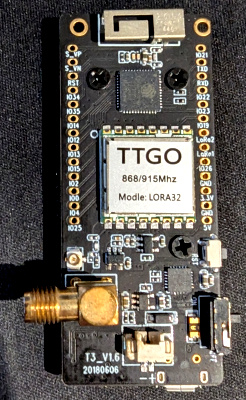
I think I updated the firmware on this a few years ago but I honestly don't remember so I'm not sure if this has factory meshtastic firmware or not.
At the time of this writing, this device still gets firmware support on meshtastic so I thought it would be easy to just use the Web Flasher.
I tried flashing "LILYGO T-LoRa V2.1-1.6" and "LILYGO T-LoRa T3-S3" on the latest beta version and after some fiddling with the on/off switch and holding down the reset to get it into flashing mode I was able to get it to flash but each time the device would just turn on some of LEDs and sit there, no screen activity.
I used the web flasher to open the serial monitor and saw a message like this (forgot to copy down the exact error)
E (300) boot: Factory app partition is not bootable
E (306) boot: No bootable app partitions in the partition table
I found a reddit comment where someone suggested using the cli instead of web flasher.
Note that I am running these operations on windows 11 but steps are similar on other platforms since you can pip install esptool.
I mainly followed steps from flashing with the cli.
chip_id
The docs suggest getting the board information with the chip_id command with esptool.
This is to help confirm what firmware file you should flash.
You can get the info for what firmware file in the devices page.
This device is considered a "Lora V2.1-1.6" since I'm on the 1.6 PCB revision.
See at the resources section Firmware file: firmware-tlora-v2-1-1.6-X.X.X.xxxxxxx.bin
Ran this in powershell
esptool -p COM3 chip_id
esptool.py v4.6.2
Serial port COM3
Connecting....
Detecting chip type... Unsupported detection protocol, switching and trying again...
Connecting....
Detecting chip type... ESP32
Chip is ESP32-PICO-D4 (revision v1.0)
Features: WiFi, BT, Dual Core, 240MHz, Embedded Flash, VRef calibration in efuse, Coding Scheme None
Crystal is 40MHz
MAC: 50:02:91:<REDACTED>
Uploading stub...
Running stub...
Stub running...
Warning: ESP32 has no Chip ID. Reading MAC instead.
MAC: 50:02:91:<REDACTED>
Hard resetting via RTS pin...
Important part is that this is a "regular" ESP32, so we download the latest firmware-esp32*.zip firmware release from github (ie firmware-esp32-2.7.3.cf574c7.zip) and unpacked it.
Trouble with device-install.bat
First thing was that I didn't realize that device-install.bat was bundled with the firmware zip.
I wasted some time looking around github for a copy of the script until I looked into the unzipped folder with all the required scripts, oh well.
Firmware file to use is firmware-tlora-v2-1-1_6-2.6.11.60ec05e.bin.
So I cd'd to the firmware folder in powershell and tried to install the firmware but got an error.
.\device-install.bat -p COM3 -f .\firmware-tlora-v2-1-1_6-2.6.11.60ec05e.bin
INFO  | 13:22:09 9 Using esptool port: COM3.
INFO  | 13:22:09 10 Using esptool baud: 1200.
INFO  | 13:22:09 17 Trying to flash "firmware-tlora-v2-1-1_6-2.6.11.60ec05e.bin", but first erasing and writing system information...
esptool.py v4.6.2
Serial port COM3
Connecting......................................

A fatal error occurred: Failed to connect to Espressif device: No serial data received.
For troubleshooting steps visit: https://docs.espressif.com/projects/esptool/en/latest/troubleshooting.html
ERROR | 13:22:19 18 Error running command: esptool --port COM3 --baud 1200 erase_flash
No matter what I tried, I could only get different errors. I mainly tried hitting the rst button or re-plugging the usb while holding the rst button to no avail.
I think what worked best was holding the rst button while flipping the small on/off switch to reset the device into flashing mode but you may not need to do this.
I found there was a debug flag in the script so I tried that.
 .\device-install.bat -p COM3 -f .\firmware-tlora-v2-1-1_6-2.6.11.60ec05e.bin --debug
DEBUG | 13:20:55 1 DEBUG mode: enabled.
DEBUG | 13:20:55 2 Checking FILENAME parameter...
DEBUG | 13:20:55 3 Filename: .\firmware-tlora-v2-1-1_6-2.6.11.60ec05e.bin
DEBUG | 13:20:55 4 Checking if firmware-tlora-v2-1-1_6-2.6.11.60ec05e.bin exists...
DEBUG | 13:20:55 5 We are NOT working with a *update* file. firmware-tlora-v2-1-1_6-2.6.11.60ec05e.bin
DEBUG | 13:20:55 6 Determine the correct esptool command to use...
DEBUG | 13:20:55 7 Python interpreter NOT supplied. Looking for esptool...
DEBUG | 13:20:55 8 Checking esptool command esptool...
DEBUG | 13:20:55 9 Skipping ESPTOOL_CMD steps.
DEBUG | 13:20:55 10 Using esptool command: REM esptool
INFO  | 13:20:55 11 Using esptool port: COM3.
INFO  | 13:20:55 12 Using esptool baud: 1200.
DEBUG | 13:20:55 13 We are NOT working with a *-tft-* file. firmware-tlora-v2-1-1_6-2.6.11.60ec05e.bin
DEBUG | 13:20:55 14 Computed firmware basename: tlora-v2-1-1_6-2.6.11.60ec05e.bin
DEBUG | 13:20:55 15 Set OTA_FILENAME to: bleota.bin
DEBUG | 13:20:55 16 Set SPIFFS_FILENAME to: littlefs-tlora-v2-1-1_6-2.6.11.60ec05e.bin
DEBUG | 13:20:55 17 Set OTA_OFFSET to: 0x260000
DEBUG | 13:20:55 18 Set SPIFFS_OFFSET to: 0x300000
INFO  | 13:20:56 19 Trying to flash "firmware-tlora-v2-1-1_6-2.6.11.60ec05e.bin", but first erasing and writing system information...
DEBUG | 13:20:56 20 About to run command: REM esptool --port COM3 --baud 1200 erase_flash
DEBUG | 13:20:56 21 About to run command: REM esptool --port COM3 --baud 1200 write_flash 0x00 firmware-tlora-v2-1-1_6-2.6.11.60ec05e.bin
INFO  | 13:20:56 22 Trying to flash BLEOTA "bleota.bin" at OTA_OFFSET 0x260000...
DEBUG | 13:20:56 23 About to run command: REM esptool --port COM3 --baud 1200 write_flash 0x260000 bleota.bin
INFO  | 13:20:56 24 Trying to flash SPIFFS "littlefs-tlora-v2-1-1_6-2.6.11.60ec05e.bin" at SPIFFS_OFFSET 0x300000...
DEBUG | 13:20:56 25 About to run command: REM esptool --port COM3 --baud 1200 write_flash 0x300000 littlefs-tlora-v2-1-1_6-2.6.11.60ec05e.bin
INFO  | 13:20:56 26 Script complete.
Script seems to do nothing (basically dry-run) but I found the esptool commands to run, find the lines with About to run command: REM esptool.
esptool --port COM3 --baud 1200 erase_flash
esptool --port COM3 --baud 1200 write_flash 0x00 firmware-tlora-v2-1-1_6-2.6.11.60ec05e.bin
esptool --port COM3 --baud 1200 write_flash 0x300000 littlefs-tlora-v2-1-1_6-2.6.11.60ec05e.bin
I decided to remove the --baud flag in case that was part of the issue with the script, since earlier I was able to run erase_flash without the baud rate set.
Using esptool
esptool --port COM3 erase_flash
esptool --port COM3 write_flash 0x00 firmware-tlora-v2-1-1_6-2.6.11.60ec05e.bin
esptool --port COM3 write_flash 0x300000 littlefs-tlora-v2-1-1_6-2.6.11.60ec05e.bin
I ran those three commands without issue and was able to get the device registered to my android app.
While writing this post I wanted to try and get some of the original errors out of the serial log again but I found that I was able to use the web flasher to reflash the firmware onto my ttgo.
The device seems to work better after doing the web flash. The LEDs act differently and the small OLED is displaying information about incoming data, which it wasn't really picking up data before.
Maybe these instructions will be helpful to someone trying to to a hard reset to the firmware, although I suspect doing the erase_flash may be enough for some devices with ancient or strange factory firmware.